> ## Documentation Index
> Fetch the complete documentation index at: https://docs.herondata.io/llms.txt
> Use this file to discover all available pages before exploring further.
# Authentication
## Development vs Production
We handle development and production environments at the credential level. We will issue you with a set of dashboard and API credentials you can use for development purposes during your trial / onboarding phase.
When you’re ready to move to production, please contact us, and we will issue you a set of production credentials.
## Dashboard
Log in to the [Heron dashboard](https://dashboard.herondata.io) using the credentials you were issued.
From **Settings → API Credentials**, you can manage the API keys used to authenticate against the Heron API.
If you haven't received access, please speak to your Heron rep, or email us at [hello@herondata.io](mailto:hello@herondata.io).
To reset your password, go to the [dashboard login page](https://dashboard.herondata.io) and follow the “Forgot password?” flow.
## API keys
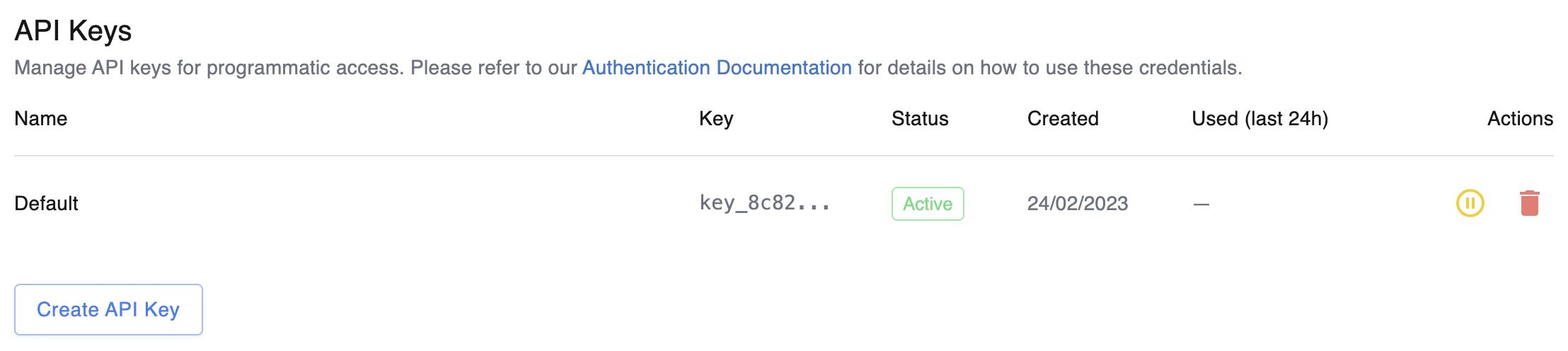
You can create, list, deactivate, reactivate, and delete API keys from **Settings → API Credentials** in the dashboard.
 ### Creating a key
Click **Create API key**, give it a descriptive name (e.g. `CI pipeline`, `Production service`), and copy the token from the dialog that appears.
The full token is shown **once, at creation time** and cannot be retrieved later. Store it in a secret manager (e.g. GCP Secret Manager, AWS Secrets Manager, Vault) immediately.
If you lose a token, create a new key and delete or deactivate the old one.
After the dialog closes, only the first 8 characters of the token (the prefix) are visible — enough to identify which key is which, but not enough to authenticate with.
### Deactivating and reactivating
Deactivating a key takes effect **immediately** — requests using a deactivated key are rejected with a 401. Reactivating restores access.
Use deactivation when you suspect a key may be compromised but aren’t ready to delete it (e.g. to confirm the key is no longer in use). Deleting a key is irreversible.
### Rotation
A typical rotation flow:
1. Create a new key with a descriptive name.
2. Deploy the new key to the systems that use it.
3. Once the new key is in use, deactivate the old one and confirm nothing breaks.
4. Delete the old key.
### Authenticating with a key
Send the API key in the `x-api-key` HTTP header. This works against every authenticated endpoint.
```bash theme={null}
curl "https://app.herondata.io/api/hello_world/authenticated" \
--header 'x-api-key: '
```
All API keys start with `key_` followed by 48 hex characters.
### Creating a key
Click **Create API key**, give it a descriptive name (e.g. `CI pipeline`, `Production service`), and copy the token from the dialog that appears.
The full token is shown **once, at creation time** and cannot be retrieved later. Store it in a secret manager (e.g. GCP Secret Manager, AWS Secrets Manager, Vault) immediately.
If you lose a token, create a new key and delete or deactivate the old one.
After the dialog closes, only the first 8 characters of the token (the prefix) are visible — enough to identify which key is which, but not enough to authenticate with.
### Deactivating and reactivating
Deactivating a key takes effect **immediately** — requests using a deactivated key are rejected with a 401. Reactivating restores access.
Use deactivation when you suspect a key may be compromised but aren’t ready to delete it (e.g. to confirm the key is no longer in use). Deleting a key is irreversible.
### Rotation
A typical rotation flow:
1. Create a new key with a descriptive name.
2. Deploy the new key to the systems that use it.
3. Once the new key is in use, deactivate the old one and confirm nothing breaks.
4. Delete the old key.
### Authenticating with a key
Send the API key in the `x-api-key` HTTP header. This works against every authenticated endpoint.
```bash theme={null}
curl "https://app.herondata.io/api/hello_world/authenticated" \
--header 'x-api-key: '
```
All API keys start with `key_` followed by 48 hex characters.